
ChrisGVE/docshelf.nvim
 github
 3
3
 0
0
 0
0
 0
0
docshelf.nvim
Offline API documentation, read inside Neovim.
docshelf downloads documentation once and converts it into plain text you read in a normal
buffer, split into one page per entry (List.add() is a page of its own), with Neovim's
conceal features doing the formatting. Opening a page and grepping across everything you
have installed are local operations: nothing is fetched while you read.
Documentation comes from several places: the whole devdocs.io catalogue, Haskell packages from Hackage, Rust crates from docs.rs, any Sphinx site (Python and much of the scientific stack), Go modules from pkg.go.dev, any DocC site, Apple's own developer documentation included, Dash docsets, Kapeli's own and the user-contributed ones, Elixir, Erlang and Gleam packages from hexdocs.pm, Odin's standard library and vendor bindings from pkg.odin-lang.org, Perl distributions from MetaCPAN, Java, Kotlin and Scala libraries from Maven Central, Ruby gems from gemdocs.org, Crystal's standard library from crystal-lang.org, Julia packages from their Documenter.jl sites, OCaml packages from ocaml.org, Clojure libraries from cljdoc.org, and Nim packages from their nimdoc sites. Every docset knows its language, so a Rust session and a Python session can each narrow the pickers to what they need.
docshelf.nvim began as a fork of Emmanuel Touzery's apidocs.nvim and grew well past what that plugin sets out to be; see Credits.
How to use
Everything below is also in the helpfile, :help docshelf.
Call require("docshelf").setup() when installing the plugin to register the commands.
The plugin exports the following commands:
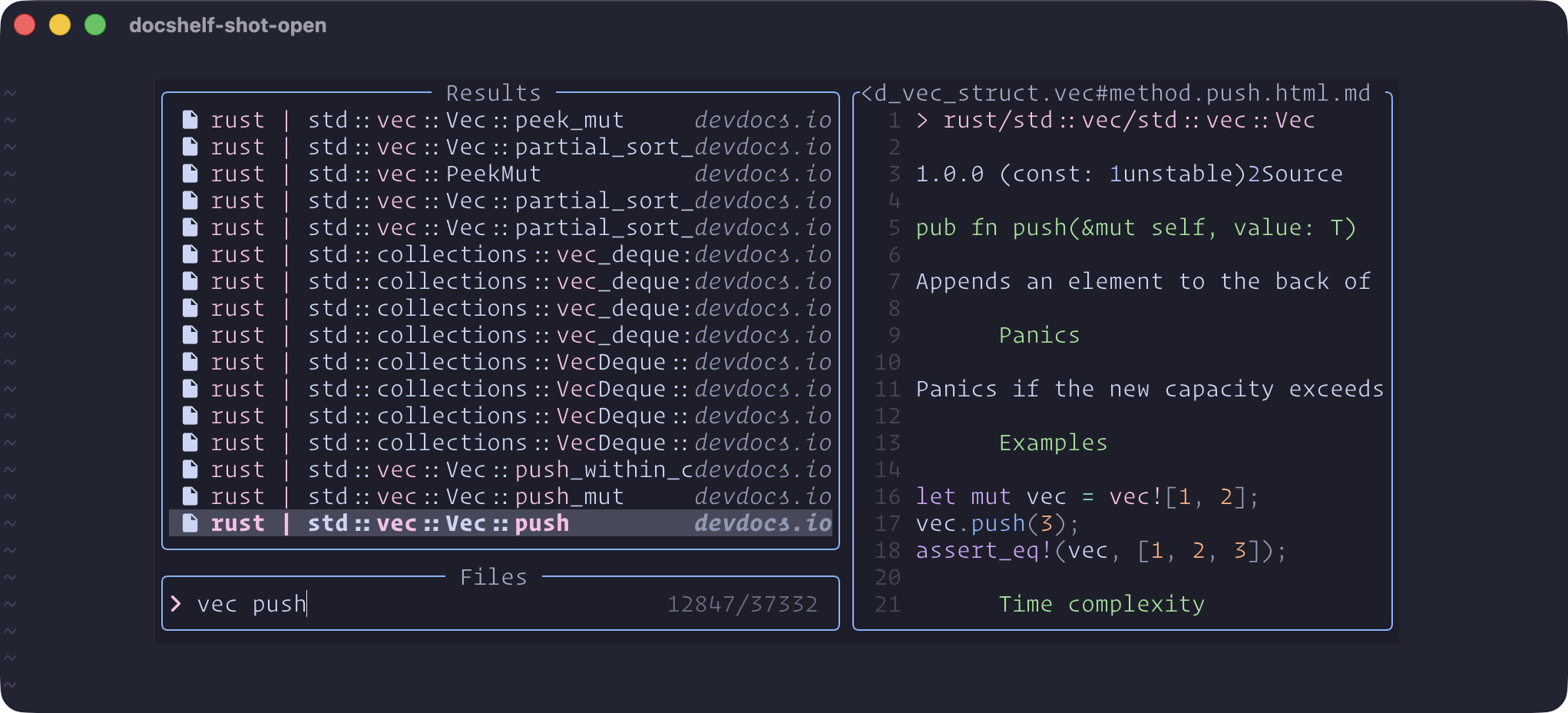
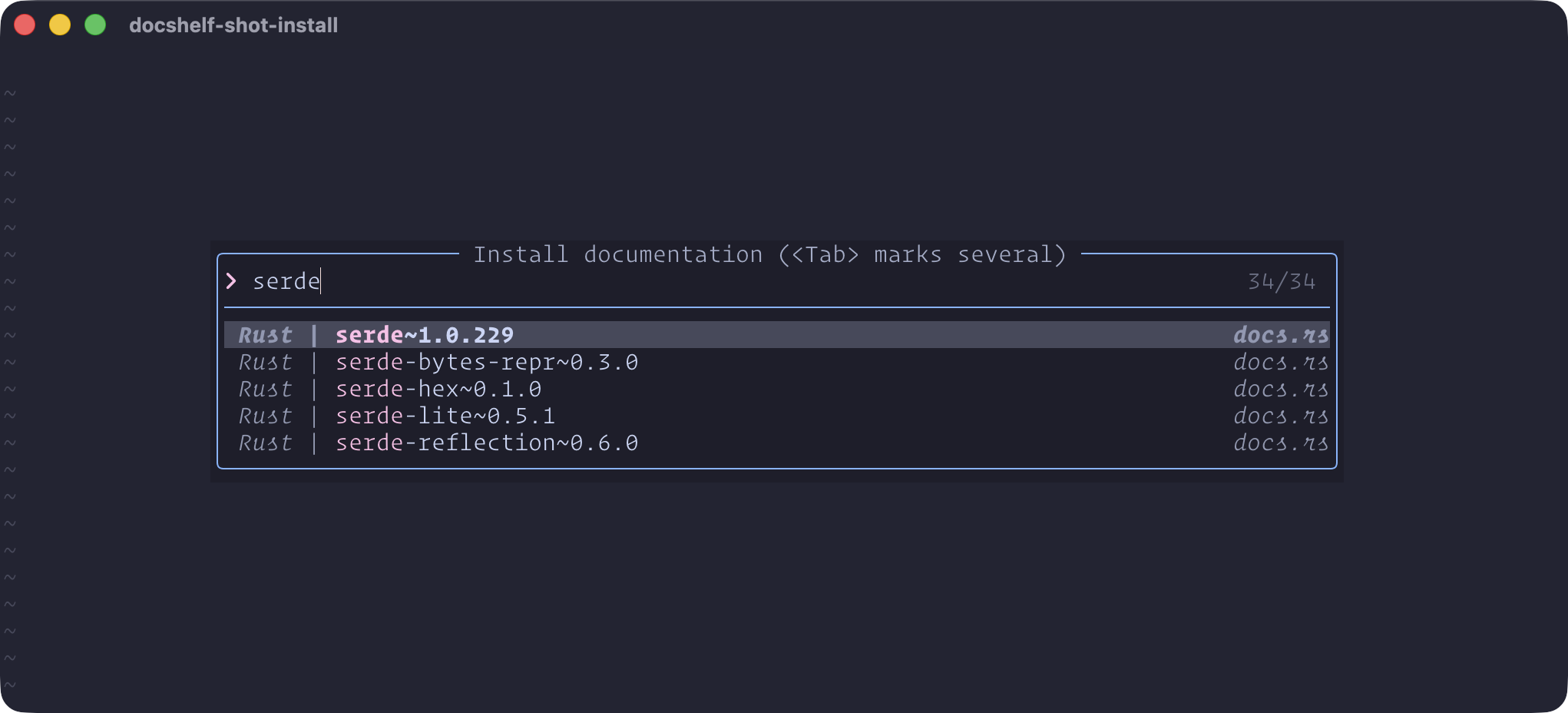
DocshelfInstall- ask which documentation to install, and install it. Each row shows a source's release and install state, with where it comes from at the right edge. With snacks.nvim,<Tab>marks several sources, and marks are kept when you change the search. Sources install one at a time, in the background, with their place in the queue and their progress shown in a notification; picking more while an install runs adds them to the queue, and a source that fails to install is reported and skipped. A large source can take a minute or more, since the plugin uses Neovim's tree-sitter to post-process the files, but Neovim stays usable meanwhile. Where the rows come from, and how to narrow them, is in Documentation sources.DocshelfOpen(requires telescope.nvim or snacks.nvim) - open a picker listing all docshelf. If you want to display only a subset of sources, call the lua function::lua require("docshelf").docshelf_open({restrict_sources={"rust"}}). With snacks you can also pick the picker layout::lua require("docshelf").docshelf_open({layout="ivy_split"})DocshelfSearch(requires telescope.nvim or snacks.nvim) - open a picker to grep for text in all docshelf. If you want to display only a subset of sources, call the lua function::lua require("docshelf").docshelf_search({restrict_sources={"rust"}}). Thelayoutoption works here too. Each match is shown once: the install writes a.rgignorein each source folder listing the per-entry section files, which repeat text from their page (the open picker still lists them), and matches inside a page's footer of links are left out. Sources installed before this change show repeats until they are reinstalled.Sources know their language, so a filter can widen itself:
require("docshelf.languages").pulled_in(selected, installed)returns, for every selected language reference, the other installed sources of that language (selectingpython~3.14pulls innumpy~2.5andscikit_learn, but notpython~3.13; selectingnumpy~2.5alone pulls in nothing). "Language" is one flat field: a programming language, a file format or a tool (gitis Git,dockeris Docker). Each name has aliases that match it too (ts,gh,rg); a source is its language's reference when its name before~is the language's name or an alias (python~3.15,openjdk~21for Java), otherwise it belongs to the language. A source's language is decided at install and kept in.installed.json: a source that declares its language (a Hackage package is Haskell) uses it; a devdocs source found inlua/docshelf/source_languages.lua(a hand-maintained table) takes that table's answer; otherwise a source whose name before~is a name or alias from your lists gets that name. Anything else is Unknown, andrequire("docshelf.languages").unknown(installed)lists those.require("docshelf").assign_language(slug)gives any installed source a name, replacing what it had; that choice is kept when the source is refreshed, updated or reinstalled. It opens a picker over your lists plus every language already recorded on an installed source, narrowed as you type; when what you typed names none of them, the first row takes it as a new name, so a language you need once needs no config change. Your lists are thelanguages,formatsandtoolssetup options (see below). Because the table is kept by hand,nvim --headless -l scripts/check_source_languages.luacompares it with the live devdocs catalogue: it lists sources the table lacks (each with a proposed row seeded from its repository's GitHub language, to be checked by a person) and rows for sources devdocs no longer lists. It never edits the table, and it cannot tell that an existing row is wrong.DocshelfFilter- narrow every docshelf picker to a few sources, until you say otherwise. With a handful of sources installed a picker can list all of them; with several dozen, a list of everything is no longer a list of what you need. Run it with no argument for a picker over the installed sources (with snacks.nvim, tab ticks several), name them directly (:DocshelfFilter python~3.14 numpy~2.5, with completion), or clear it with:DocshelfFilter!. From then onDocshelfOpen,DocshelfSearchandDocshelfInstallonly look inside the filter; each of them takes a!to look at everything just this once without clearing it, and naming sources as arguments (:DocshelfOpen rust) overrides it for that call. The filter lives for this Neovim session, so a Rust session and a Python session each keep their own. Selecting a language's own source also brings in the other installed sources of that language --python~3.14addsnumpy~2.5andscikit_learn, whilenumpy~2.5selected alone stays alone, andpython~3.13is a different reference rather than something written in 3.14. In the picker a filled dot marks what you picked and a hollow one what a language brought along; rows readlanguage | source, and typing a language narrows to it, "Unknown" included. Narrowing is not only about reading a shorter list: a grep is one ripgrep over the sources in play, so a filter is also what keeps searching fast as the collection grows.DocshelfAssignLanguage <source>- set which language a source documents, picked from your lists (seelanguagesbelow) plus every language already recorded on an installed source. Useful for a source that came out "Unknown". The same thing is bound to<c-e>inside theDocshelfFilterpicker, where the source under the cursor is relabelled and the list redraws;require('docshelf').setup({assign_key = "<c-x>"})moves that key andfalseunbinds it.DocshelfUpdate- install again whatever has gone out of date: a devdocs source whose release has moved on (3.14.6 to 3.14.7) or that devdocs has rebuilt since, and a source from anywhere else whose origin now offers a newer version. Name sources to limit the round to them, with tab completion; with no argument everything installed is considered. A devdocs source is refreshed in place; a source named for the version it holds (text~2.1.2) is installed astext~2.1.3and the old folder is removed, carrying over the language you assigned it. A source whose origin publishes no version at all is left alone, as there is nothing to compare, and so is one installed before this release, which recorded nothing to compare with. This also runs on its own: the first time you pause after opening Neovim, and at most once a day, docshelf checks and updates in the background, using the same queue and the same progress notification as any other install. Switch that off withupdate = { auto = false }insetup(), or change how long it waits withupdate = { every_hours = 24 }. The automatic check is armed bysetup(), so if you load the plugin lazily on its commands it first runs once you have opened the docs, not at startup.DocshelfUninstall- allows to uninstall sources. Press tab to get a completion on the available ones. An uninstalled source also leaves the filter.
Advanced usage
It is possible to follow links in docs. The links are numbered, [1], [2] and so on. To follow links, you must open the document, viewing it in the picker is not enough. Once the doc is opened, position the cursor over the link, and press *. That will take you to the link text in the footer. If the link is a URL, open it as you would normally in neovim (probably gx). If it's another locally installed doc, the link will be local:// and you can follow it using <C-]>. A link to a page the docset does not hold is that page's address on the web: devdocs.io for a devdocs source, the documentation's own site for every other source.
When a link takes you to a specific part of a document, you may have to press n to get to the right spot, as we jump to the part based on text contents, doing a search in the file.
Documentation sources
Documentation comes from a source, and a source is named by its origin -- the short address it is fetched from. devdocs.io is the one every install starts with; the others are listed below, and each is an adapter that knows how to fetch and lay out its own pages, so everything after the fetch (the conversion, the links, the pickers, the filter, the update check) is the same whatever the origin.
A docset from a source other than devdocs lives in a folder named <docset>~~<origin>, which
is why two sources can each document a text and neither hides the other. What a person reads
is the docset name; the origin shows dimmed at the right edge of a picker. Each install records
its origin in the data folder's .installed.json, so pickers over installed sources can show it
too (require("docshelf.metadata").installed_origins(slugs)); sources installed before origins
were recorded count as devdocs.io.
Every source is on by default. Switching one off by its origin only removes it from the install picker; docs already installed from it stay readable and keep updating:
require('docshelf').setup({sources = {["devdocs.io"] = false}})
Searching the registries. devdocs ships a catalogue of everything it has, and the install
picker lists it; a package registry cannot ship one, so it is asked instead. With snacks, from
three letters on, every enabled source that can be searched is asked as well (at most workers
of them at once), and the answers join the list as they land, with the title naming whichever
registry is still being waited on. What a registry answered is kept in the data folder's
.registry_cache.json, so the same name typed again is offered before any request goes out. A
row whose version the registry did not give is resolved when you pick it. The Dash sources
filter a list they fetched once rather than asking a registry, so they are asked from the
first letter. Pickers other than snacks have no live input to drive this and keep offering
the catalogue alone.
Narrow the picker to one or more languages -- both the devdocs rows and the registries, which declare the language they document (hexdocs.pm declares Elixir, Erlang and Gleam, and is asked for any of them); Dash, which spans every language, is left out -- with:
:lua require("docshelf").docshelf_install({languages = {Haskell = true}})
devdocs.io
The built-in source, and the only one with a catalogue: one request lists every docset it has,
with the release and the build time of each. That is also what makes an update check cheap --
see DocshelfUpdate.
Hackage
hackage.haskell.org documents a Haskell package: the Haddock archive a release
ships (/package/<name>-<version>/docs.tar) becomes a page per module plus an entry
per documented name, qualified by its module (Data.Text.pack). Haddock's own
chrome -- header, contents, synopsis, footer, the Source and self links -- is
dropped. A docset installs as <name>~<version>~~hackage.haskell.org, and its
language is Haskell without being asked.
It answers the install picker's search: type three letters of a package name and its Hackage matches join the list, and picking one asks Hackage which version has documentation built -- a package whose docs never built is not offered.
docs.rs
docs.rs documents a Rust crate. docs.rs builds every crates.io release and ships
each build as one zip, so an install is a single request (it needs the unzip
program). A docset installs as <crate>~<version>~~docs.rs, and its language is Rust
without being asked.
It answers the install picker's search: type three letters of a crate name and its crates.io matches join the list, each already carrying the version that will be installed.
Sphinx sites
A Sphinx site -- numpy, the Python docs, most Read the Docs pages -- stands alone: there is no registry to search, so it is reached by its address. Paste the URL into the install picker and the row shows the project, its version and how many pages the install will fetch. That last number is worth reading before you pick: such a site ships no archive, so the install is one request per page (numpy is 2673 of them).
What makes it readable is the site's own objects.inv, the inventory Sphinx
publishes for cross-project linking: every documented name, the page it is on and
the anchor it sits at. A link therefore lands on the item it names rather than at
the top of its page.
pkg.go.dev
A Go package is named by its address rather than found by a search: pkg.go.dev's
robots.txt disallows its search, so there is nothing to type a name into. Paste a
pkg.go.dev URL and the row shows the package, its version and how many pages the
install will fetch -- the package the address names plus every package under it,
internal ones excepted. The standard library is reached the same way. A docset's
language is Go without being asked.
DocC sites
Apple's frameworks, the Swift book and anything else built with DocC are named by
their address: paste a documentation URL
(https://developer.apple.com/documentation/swiftui,
https://docs.swift.org/swift-book/documentation/the-swift-programming-language) and
the row shows the module and how many pages the install will fetch. A DocC site
publishes one JSON document per page rather than a page, so the install reads the
site's navigator index once and then fetches a document per symbol -- SwiftUI is over
seven thousand of them, which is why the count is shown before you pick.
A DocC site publishes no version, so such a docset carries none, and the update check leaves it alone rather than reinstalling it on a guess.
Dash docsets
Dash's docsets come from two sources, both searched by name in the install picker:
kapeli.com, Kapeli's own feeds (about 180: Lua, Bash, C++, Django, ...), and
contrib.kapeli.com, the user-contributed ones (about 630: HAProxy Lua, Jest, ...). They are
two origins because the two catalogues share names -- each has a Swift -- and the origin
keeps them apart. Each source fetches its list once per session and is asked from the first
letter typed, since C, Go, Qt and R have no longer name.
A docset installs as <name>~<version>~~kapeli.com (Lua~5.5~~kapeli.com). Picking a
Kapeli feed asks the feed for its current version; a user-contributed row already carries
it. Where Kapeli has no better number the version is its own (Bash installs as Bash~9). An
install is one .tgz archive and needs tar and the sqlite3 program, which reads the
docset's index. Sizes vary a lot -- Lua is a few hundred kilobytes, C++ 173 MB -- so a row
shows its archive's size (Lua · 237 KB) once the picker has asked kapeli.com for it: one
request per row, made only for the rows on screen.
Dash covers every language, so a docset's language comes from its name: Lua~5.5 is Lua,
and a Lua filter pulls it in. A name that is no language (HAProxy_Lua) is Unknown until you
give it one. An archive has no website behind it, so a link to a page the docset does not
hold keeps its text and loses the link.
hexdocs.pm
hexdocs.pm documents a package from hex.pm, the registry Elixir, Erlang and Gleam share.
hex.pm keeps each release's documentation as one tarball, so an install is a single request
(read with tar). Its pages are the ones hexdocs.pm serves, minus the sidebar, the search bar,
the footer and the link and source icons; its entries are what the package's own search index
lists -- every module, function, type, callback and guide, and the sections inside them
(Examples - Jason.decode/2). That index has changed shape over the years, and every shape
is read, back to packages built in 2017. A link to another package's docs goes to that
package's page on hexdocs.pm, at the version it was built against.
It answers the install picker's search: type three letters of a package name and its hex.pm matches join the list, most downloaded first (hex.pm's search has no order of relevance), each carrying the version that will be installed -- the newest stable release that has documentation. A package with none, such as one documented only on its own site, is not offered.
A docset installs as <name>~<version>~~hexdocs.pm (jason~1.4.5~~hexdocs.pm). Neither the
search nor the package record says which language a package is written in, so the docs are
asked: Gleam's index names it, and ExDoc links a stylesheet per language. jason is Elixir,
telemetry Erlang, gleam_stdlib Gleam.
pkg.odin-lang.org
pkg.odin-lang.org documents the packages that ship with the Odin compiler. Odin has no
package manager, so there is nothing to search: the source offers two docsets, and typing
odin in the install picker lists both. odin is the base and core collections -- the
standard library, and so Odin's reference -- and odin_vendor the vendor bindings (raylib,
SDL, Vulkan, ...). Picking one reads the version the site documents from the first line of its
catalogue, a few hundred bytes.
The site's own search data lists every package and every declaration in it, so each package
is an entry named by its import path (encoding/json) and each declaration one qualified by
it (encoding/json.marshal), typed as a procedure, type, constant and so on. An install then
fetches a page per package -- 180 for odin, 56 for odin_vendor in September 2026 -- and
keeps the documentation only. A link to a package the docset does not hold (from core to
vendor, say) goes to its page on the site. These are large docsets: odin is about 70,000
entries and 350 MB on disk, and took twenty minutes to install on an M-series Mac, nearly all
of it converting pages; odin_vendor is about 29,000 entries, 145 MB and ten minutes.
A docset installs as odin~<version>~~pkg.odin-lang.org (odin~dev-2026-09~~pkg.odin-lang.org).
The site only documents the newest build, so an install always holds today's version, and
DocshelfUpdate compares that with the version in the docset's name.
metacpan.org
metacpan.org documents a Perl distribution from CPAN, read through MetaCPAN's API. It
answers the install picker's search: type three letters and the distributions whose modules
MetaCPAN suggests join the list, each once, carrying the version of its latest release.
perl itself is one of them, and since it is named for the language it becomes Perl's
reference: perlfunc, perlop, perldiag and the rest of the core documentation.
An install asks MetaCPAN which files of that release carry documentation, then fetches each
one's POD as a page. Every module is an entry (Moose::Util), and so is every heading below
the top level and every =item in it, named after the module (Moose::Util is_role($package_or_obj), perlfunc sprintf FORMAT, LIST) and typed by the section holding
it (Exported Functions, Methods). A link to a module the docset holds names that module's
page; any other goes to metacpan.org. Moose is 133 modules and about 1,500 entries, half a
minute to install; perl is 346 pages and about 12,400 entries, 62 MB and five minutes on an
M-series Mac, nearly all of it converting pages.
A docset installs as <distribution>~<version>~~metacpan.org (Moose~2.4000~~metacpan.org).
The version is the one the release is named for (perl-5.44.0 gives perl~5.44.0), and
DocshelfUpdate compares it with the distribution's latest release.
Maven Central
central.sonatype.com documents a Java, Kotlin or Scala library from Maven Central, which
keeps beside most releases a -javadoc.jar: the HTML documentation the library's build
generated. An install is that one jar (read with unzip). It answers the install picker's
search: type three letters and the artifacts Maven Central finds join the list, only those
that ship such a jar, each carrying its newest release.
The entries are what the jar's own search index lists -- every package, type and member --
and every generator's index is read: javadoc's (both the one it writes since JDK 11 and the
older index-all.html), Scala 3's and Scala 2's scaladoc, and Kotlin's Dokka. The language
is the generator's: javadoc is Java, scaladoc Scala, Dokka Kotlin. The pages are those the
index names; the jar's class-use pages, trees and lists are left out, and a link to one goes
to javadoc.io. Many Kotlin libraries (okhttp, kotlinx-coroutines) publish an empty placeholder
jar instead, and such a docset is refused with a message saying so. commons-lang3 is about
4,600 entries, 29 MB and a minute and a half to install on an M-series Mac; cats-core_3
about 6,700 entries and two and a half minutes; ktor-client-core-jvm about 1,200 entries
and half a minute.
A docset installs as <artifact>@<group>~<version>~~central.sonatype.com
(cats-core_3@org.typelevel~2.13.0~~central.sonatype.com): an artifact's name alone is
ambiguous, two unrelated cats-core exist. DocshelfUpdate compares the version with the
artifact's newest release.
gemdocs.org
gemdocs.org documents a Ruby gem: the site builds every gem's YARD documentation ahead of
time. It answers the install picker's search: type three letters and the gems rubygems.org
finds join the list, the most downloaded first. A row carries no version, because gemdocs
does not always have the newest release built yet (nokogiri 1.19.4 was released while its
docs stopped at 1.19.2); the pick installs the newest version gemdocs has.
The entries are YARD's own lists: every class and module (Nokogiri::XML::NodeSet), every
method as Ruby writes it (Nokogiri::XML::NodeSet#css, Nokogiri::HTML4::Document.parse,
operators included: NodeSet#&, NodeSet#<=>), typed Instance Methods or Class Methods, every constant, and the gem's extra files such as its README. A page is fetched
per class and module; the source code YARD shows under each method is left out. A link to a
page the docset holds names that page; any other goes to gemdocs.org.
A docset installs as <gem>~<version>~~gemdocs.org (nokogiri~1.19.2~~gemdocs.org), and
DocshelfUpdate compares the version with the newest one gemdocs has built.
crystal-lang.org
crystal-lang.org documents Crystal's standard library. Crystal has no central package
registry, so there is one docset, crystal: type part of its name in the install picker and
it is offered at the newest release. Named for the language, it becomes Crystal's reference.
An install is the site's own index of the whole API, one file, then a page per type. Every
type is an entry (Array, Atomic::Flag), and so is every constructor, class method and
macro (Array.new(initial_capacity : Int)), every instance method (Array#&(other : Array(U))) and every constant (Signal::INT); each overload of a method is an entry of its
own, named with its parameters. The top level's methods and macros (puts, record) are
entries without a type. A link to a page the docset holds names that page; any other goes to
crystal-lang.org.
Crystal 1.21.0 is 734 pages and about 17,300 entries, 89 MB and nine minutes to install on
an M-series Mac, nearly all of it converting pages.
A docset installs as crystal~<version>~~crystal-lang.org (crystal~1.21.0~~crystal-lang.org),
and DocshelfUpdate compares the version with the newest release.
ocaml.org
ocaml.org documents OCaml packages: it builds every opam package's documentation with odoc
and serves it itself. It answers the install picker's search: type three letters and the
packages ocaml.org finds join the list, best match first, each with its newest version. A
package ocaml.org has no documentation for is left out. OCaml's standard library is on
devdocs.
An install reads odoc's own search index, one file naming everything the package documents,
then fetches a page per module, module type, class and extra file. Every module is an entry
(Lwt, Lwt.Infix), and so is every type, value, exception, constructor, record field,
method and extension, named the way odoc names it (Lwt.bind, Lwt.state.Return, operators
included: Lwt.Infix.(>>=)), and typed accordingly. Each library's list of modules (Library lwt.unix) and each extra file, such as the README, is an entry too. The link to each item's
source listing is left out. A link to a page the docset holds names that page; any other,
including one to another package's documentation, goes to ocaml.org.
lwt 6.1.2 is 78 pages and about 1,300 entries, 5.7 MB and 42 seconds to install on an
M-series Mac.
A docset installs as <package>~<version>~~ocaml.org (lwt~6.1.2~~ocaml.org), and
DocshelfUpdate compares the version with the newest one ocaml.org documents.
Documenter sites (Julia)
Julia packages are registered in the General registry, but each one publishes its
documentation on a site of its own, nearly always built with Documenter.jl. Type part of a
package's name in the install picker and the registry's names are searched; picking one reads
the site Documenter deploys by default, the repository's GitHub Pages
(https://<owner>.github.io/<Package>.jl/stable/, which redirects to the project's own domain
where it has one). A package documented somewhere else -- Plots and Makie are -- is reached the
way a Sphinx site is: paste the address of any page of its documentation into the install
picker, and the row shows the package, its version and how many pages the install will fetch.
Julia's own manual is on devdocs.
An install reads the site's search index, one file naming every page, section and docstring,
then fetches a page per page. Every page is an entry, and so is every section and every
docstring (DataFrames.innerjoin, Base.:-), typed by what it documents: function, method,
type, macro, constant, keyword or module. Each method of a function is its own entry, landing
on its own docstring. A link to a page the docset holds names that page; any other goes back
to the site. DataFrames 1.8.2 is 20 pages and 287 entries, 2.7 MB and 19 seconds to install
on an M-series Mac; Julia's manual, typed as https://docs.julialang.org/en/v1/, is 158 pages
and about 4,150 entries.
A docset installs as <Package>~<version>~~documenter (DataFrames~1.8.2~~documenter), named
for the version the site was built for. The site it came from is remembered in the data
folder's .documenter_sites.json, and DocshelfUpdate asks that site which version it holds
now.
cljdoc.org
cljdoc.org documents Clojure and ClojureScript libraries from Clojars and Maven Central.
It answers the install picker's search: type three letters and the libraries cljdoc finds
join the list, best match first, named artifact@group (ring-core@ring), because the
same artifact name can live in several groups. A row carries no version: the pick installs
the version cljdoc shows by default, which is not always the newest release. A version
cljdoc has not built yet cannot be installed; asking for it at cljdoc.org starts a build.
An install is two requests: cljdoc's search set, naming everything the library documents,
and its offline bundle, the whole documentation as one zip (read with unzip). Every
namespace is an entry (ring.util.response), and so is every var, macro, protocol and
multimethod, named the way Clojure writes it (ring.util.response/redirect,
clojure.core.async/>!), every protocol method, and every article with each of its
sections. The raw docstring cljdoc keeps beside each rendered one is left out. A link to a
page the docset holds names that page; any other goes to cljdoc.org. malli 0.20.2 is about
1,000 entries, 5 MB and 40 seconds to install on an M-series Mac.
A docset installs as <artifact>@<group>~<version>~~cljdoc.org
(ring-core@ring~1.15.5~~cljdoc.org), and DocshelfUpdate compares the version with the
one cljdoc shows now.
nimdoc sites (Nim)
Nim's package list names no documentation host: the documentation that exists is nearly
always built with nim doc and published on the repository's GitHub Pages
(https://<owner>.github.io/<repo>/), or at an address the package declares. Type part of a
package's name in the install picker and the package list is searched; picking one reads the
declared address first, then the GitHub Pages one. Most listed packages publish no
documentation at all -- about 350 of 2,950 do, pixie, jsony, cligen, npeg and arraymancer
among them -- and a pick that finds no site says so. A site anywhere else is reached the way
a Sphinx site is: paste the address of any page of it into the install picker, and the row
shows the package, the day the site was generated and how many pages the install will fetch.
Nim's standard library is on devdocs.
An install reads the site's index, theindex.html, then fetches a page per module. Every
module is an entry (pixie/paints), and so is every symbol, named with its module and its
parameter types (paints.colorStop(Color, float32), images.$(Image)) and typed by the
section the module page lists it in: type, var, let, const, proc, func, method, iterator,
converter, macro or template. Each overload is its own entry. A generic's constraint is left
out of its name (seq[T], not seq[T: int or float]). A link to a page the docset holds
names that page; any other goes back to the site. pixie is 452 entries, 2.1 MB and 15 seconds
to install on an M-series Mac; arraymancer about 1,700 entries in under a minute.
A nimdoc site names no version of its package, so a docset is named for the day its site was
generated: <package>~<day>~~nimdoc (pixie~2026-09-13~~nimdoc). The site it came from is
remembered in the data folder's .nimdoc_sites.json, and DocshelfUpdate asks that site
whether it has been generated again since.
Dependencies
This plugin requires:
- the telescope.nvim neovim plugin (optional, needed for preview and search)
- the snacks.nvim neovim plugin (optional, needed for preview and search)
- the https://github.com/rkd77/elinks elinks TUI browser, to convert HTML
- ripgrep
- curl
- tar, for Dash docsets and hexdocs.pm; sqlite3, for Dash docsets
- unzip, for docs.rs, Maven Central and cljdoc.org
- linux and probably OSX. Windows will not work, except maybe using WSL
- treesitter for html and markdown_inline, easiest way to get them is via treesitter.nvim plugin
Installation
Lazy.nvim
return {
  'ChrisGVE/docshelf.nvim',
  dependencies = {
    'nvim-treesitter/nvim-treesitter',
    'nvim-telescope/telescope.nvim', -- or, 'folke/snacks.nvim'
  },
  cmd = { 'DocshelfSearch', 'DocshelfInstall', 'DocshelfOpen', 'DocshelfFilter', 'DocshelfAssignLanguage', 'DocshelfUpdate', 'DocshelfUninstall' },
  config = function()
    require('docshelf').setup()
    -- Picker will be auto-detected. To select a picker of your choice explicitly you can set picker by the configuration option 'picker':
    -- require('docshelf').setup({picker = "snacks"})
    -- Possible options are 'ui_select', 'telescope', and 'snacks'
    -- With snacks, the picker layout defaults to the "telescope" preset. Any snacks layout preset name or layout table works:
    -- require('docshelf').setup({picker = "snacks", layout = "ivy_split"})
    -- You can change the keymap for following "local://" links by setting the configuration option 'follow_link_keymap' (default is "<C-]>"):
    -- require('docshelf').setup({follow_link_keymap = "<C-]>"})
    -- The names a source can be linked to, in three lists joined into one. Languages: Python, CPython, Rust, C, C++,
    -- C#, .NET, Java, TypeScript, JavaScript, Go, PHP, Ruby, Odin, Zig, Elixir, Kotlin, Swift, Dart, Scala, Haskell,
    -- Lua, Perl, R, Julia, Erlang, OCaml, Nim, Clojure, WebAssembly, HTML, CSS, Sass, Less, GraphQL, Vue, Svelte, SQL,
    -- PostgreSQL, SQLite, MS SQL, Bash, Zsh, Fish, PowerShell, TeX, LaTeX, BibTeX. Formats: Markdown, JSON, JSON5,
    -- YAML, TOML, Typst. Tools: Git, GitHub, Jujutsu, Docker, tmux, herdr, Neovim, Make, CMake, Homebrew, curl,
    -- ripgrep, fd, jq, SSH. Each SQL engine is its own name rather than a flavour of SQL, and LaTeX, TeX and BibTeX
    -- are distinct. For each list, 'add' extends it and 'only' replaces it. A name can carry aliases that match it too:
    -- require('docshelf').setup({languages = {add = {"Fortran", "Prolog"}}, tools = {add = {{"Kubernetes", aliases = {"k8s"}}}}})
    -- In the DocshelfFilter picker, the key that sets the language of the source under the cursor (false unbinds it):
    -- require('docshelf').setup({assign_key = "<c-e>"})
    -- Async work (page conversion during an install, registry searches) runs 4 jobs at once; 'workers' changes that (installs still run one at a time):
    -- require('docshelf').setup({workers = 8})
    -- Every documentation source is on. Switching one off by its origin only removes it from the install picker; docs already installed from it stay readable and keep updating:
    -- require('docshelf').setup({sources = {["devdocs.io"] = false}})
  end,
  keys = {
    -- A capital letter is the same thing over every source, ignoring the
    -- filter without clearing it.
    { '<leader>sad', '<cmd>DocshelfOpen<cr>', desc = 'Search Api Doc' },
    { '<leader>saD', '<cmd>DocshelfOpen!<cr>', desc = 'Search Api Doc (all sources)' },
    { '<leader>sas', '<cmd>DocshelfSearch<cr>', desc = 'Grep Api Docs' },
    { '<leader>saS', '<cmd>DocshelfSearch!<cr>', desc = 'Grep Api Docs (all sources)' },
    { '<leader>saf', '<cmd>DocshelfFilter<cr>', desc = 'Filter Api Docs' },
    { '<leader>saF', '<cmd>DocshelfFilter!<cr>', desc = 'Clear the Api Docs filter' },
    { '<leader>sai', '<cmd>DocshelfInstall<cr>', desc = 'Install Api Docs' },
    { '<leader>saI', '<cmd>DocshelfInstall!<cr>', desc = 'Install Api Docs (all languages)' },
  },
}
Vim.pack
vim.schedule(function()
    vim.pack.add({ "https://github.com/ChrisGVE/docshelf.nvim" })
    require("docshelf").setup() -- You can check the default configuration and add options to the setup. Check `lazy.nvim` installation for examples
end)
Coming from apidocs.nvim
docshelf keeps its documentation in a folder of its own, docshelf-data under Neovim's
data directory. To keep what apidocs.nvim installed, move its folder before the first
install:
mv ~/.local/share/nvim/apidocs-data ~/.local/share/nvim/docshelf-data
Everything else is renamed the same way: :ApidocsOpen is :DocshelfOpen,
require("apidocs") is require("docshelf"), and so on.
Extra screenshots
Installing: typing "serde" asks docs.rs as you type.
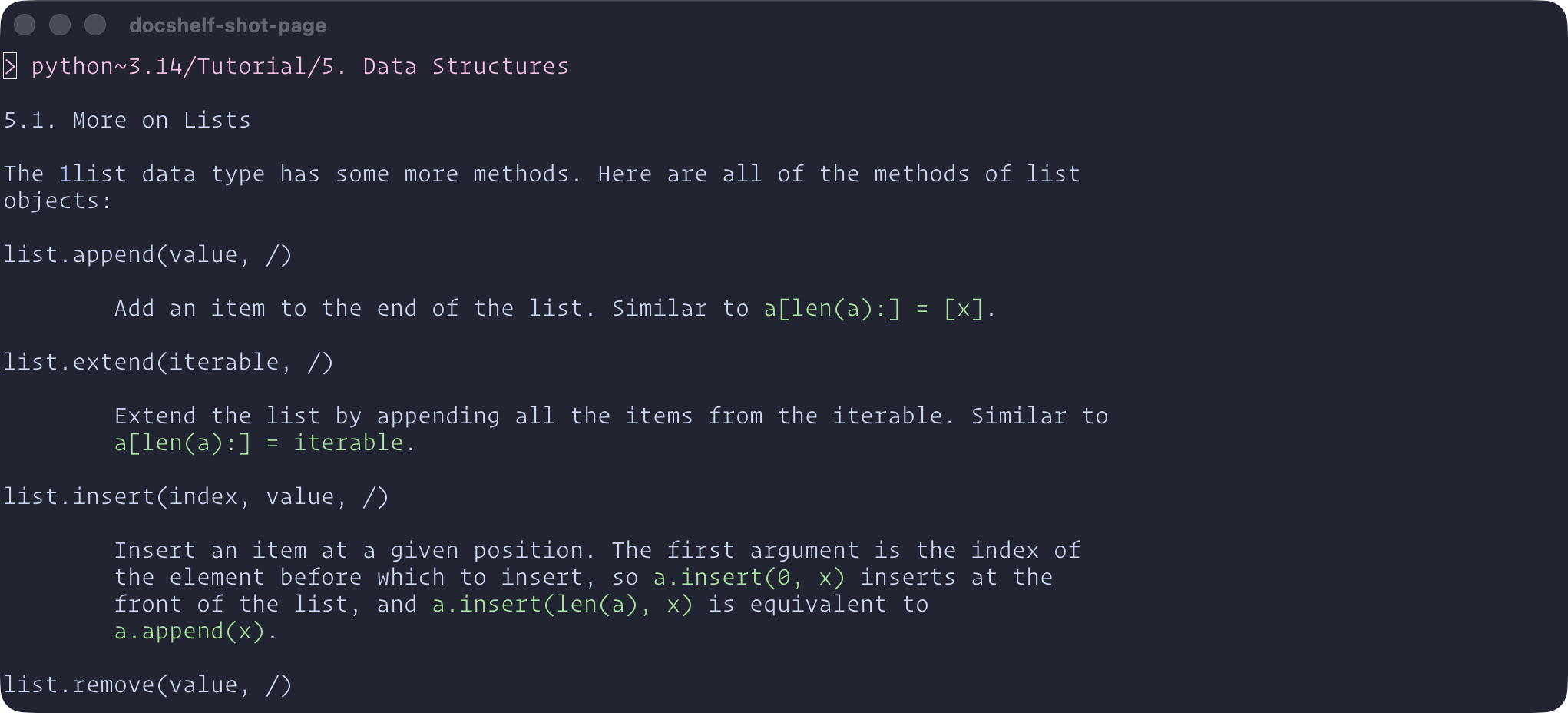
Reading: a page opens as a buffer, here Python's tutorial on lists.
Extension points
If you wish to integrate these docs with your own scripts or another picker, you can use the following functions exported by docshelf.nvim:
require("docshelf").data_folder()-- the folder where the converted apidoc files can be foundrequire("docshelf").open_doc_in_new_window(docs_path)-- open the documentation for a specific apidoc in a new window, where conceal and links navigation is properly set uprequire("docshelf").open_doc_in_cur_window(docs_path)-- open the documentation for a specific apidoc in the current window, with conceal and links navigation is properly set up. Compared to open_doc_in_new_window(), winfixbuf is not set.require("docshelf").load_doc_in_buffer(buf, docs_path)-- open the documentation for a specific apidoc in a buffer. You must set up conceal on the window yourself (conceallevel=2, concealcursor="n"). Link navigation is not set up, this is meant for a picker's preview not standalone display.require("docshelf").docshelf_filter()-- open the filter picker.require("docshelf").filteris the filter itself:set(names),clear(),active()(the sources picked, or nil),languages()(what they are written in) andinstalled(). Every picker call takesfollow_filter = falseto ignore it once, which is what the!commands pass.require("docshelf").ensure_install(langs)-- install all languages in the provided array. E.g. iflangsis{ "lua~5.4", "rust" }then the docs for Lua 5.4 and Rust will be installed. You can call this function aftersetup()in your configuration to ensure that your desired languages are available. Missing ones join the same install queue asDocshelfInstall, so they never install at the same time as each other or as sources picked there.
Credits
docshelf.nvim is a derivative work of apidocs.nvim by Emmanuel Touzery. The devdocs.io integration, the conversion to text and the pickers at the heart of this plugin are his; docshelf adds the other sources, languages, the filter, updates and the install queue on top. Many thanks to him for the plugin, and for his kind encouragement to carry this work on as a project of its own. If all you want is devdocs.io in Neovim, lightweight, apidocs.nvim is the plugin to use.
apidocs.nvim in turn credits https://github.com/luckasRanarison/nvim-devdocs for the initial project which inspired it, and the documentation itself belongs to the projects that publish it.
License
docshelf.nvim is licensed under the Apache License 2.0. The code that comes from apidocs.nvim remains under its MIT license, whose copyright and permission notice are kept in full in NOTICE.