
batoaqaa/nvim-pio
 github
 20
20
 0
0
 0
0
 0
0
🚀 nvim-pio






A high-performance, asynchronous embedded development framework for Neovim. It bridges PlatformIO project structures with clangd language servers, managing include file mappings and cross-compiler parameter translations on Windows, Linux, and macOS.
✨ Features
- Zero-Friction Project Scaffolding: Interactively selects boards and frameworks, auto-installs PlatformIO CLI if missing, fetches board metadata, and generates
src/andinclude/template files. - Automated Code Insights Mapping: Discovers and binds toolchain include vectors, firmware library locations, and environment frameworks to
clangdviacompile_commands.json. - Compiler Flags Neutralization: Intercepts and strips non-standard bare-metal toolchain argument options (such as
-mlongcalls) that destabilize desktop language servers. - Diagnostic Filtration Interface: Provides a dynamic selecting utility via
:ClangdFilterto instantly toggle specific syntax warnings or static alerts. - Self-Healing Persistent Configuration: Workspace options are bound to local context directories, ensuring layout rules persist across cold reboots.
⚡ Isolated Evaluation Environment (Zero-Risk Sandbox)
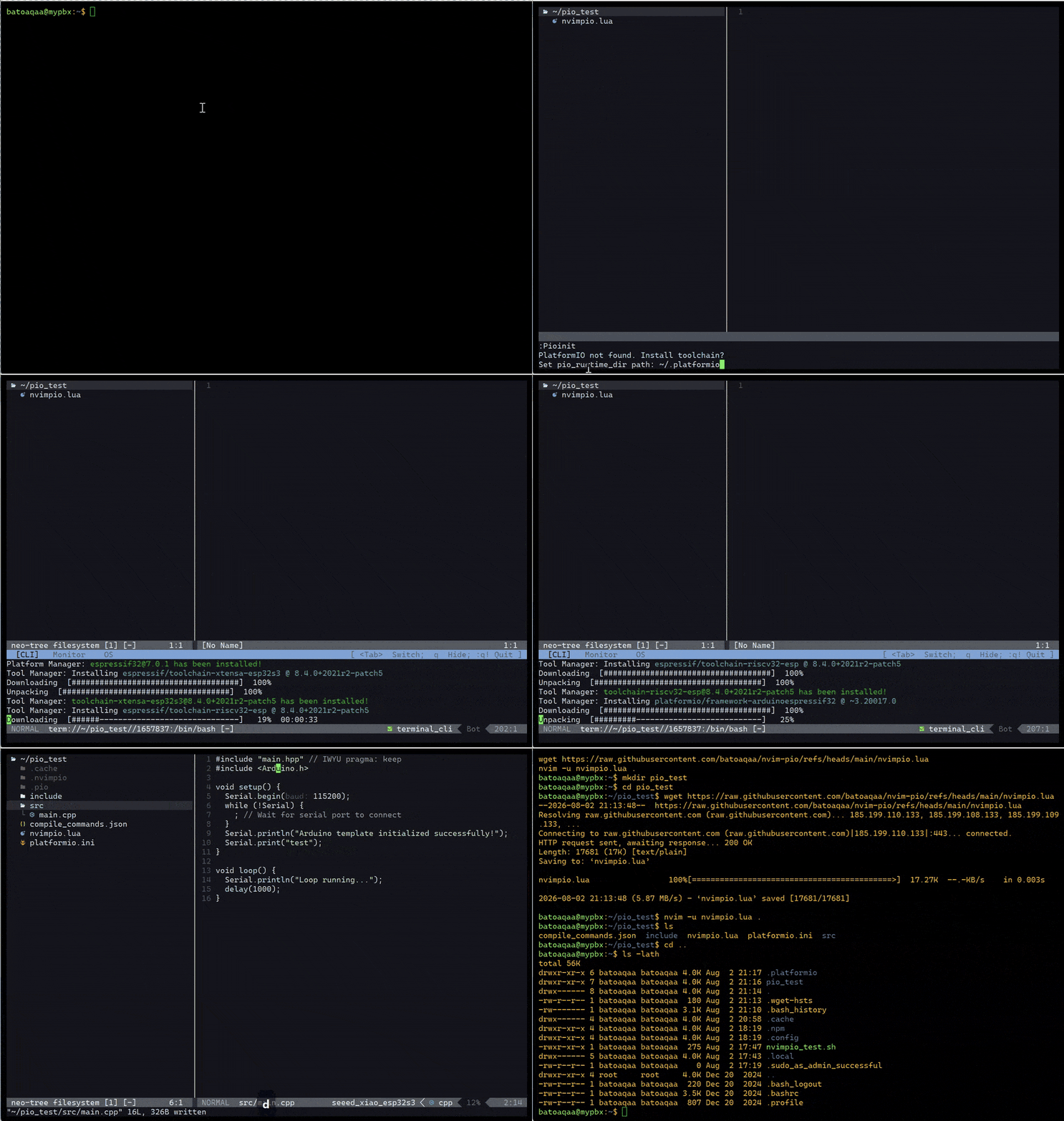
Test the complete capabilities of this extension inside an insulated runtime sandbox without modifying your production editor configurations. Execute this sequence from a standard terminal prompt:
cd
mkdir pio_test
cd pio_test

# Fetch the automated sandbox bootstrapper script
wget https://raw.githubusercontent.com/batoaqaa/nvim-pio/refs/heads/main/nvimpio.lua

nvim -u nvimpio.lua .
1. Initialize Project (:Pioinit)
Inside Neovim, kickstart your environment using:
:Pioinit
- Auto-Dependency Check: If PlatformIO CLI is not installed, it will prompt you to install it (
Y/N). - Interactive Board Selection: Type or select your target board (e.g.,
seeed_xiao_esp32s3). - Framework Selection: Choose your framework (e.g.,
arduino). - Automated Setup: A terminal buffer will open, download required board packages, collect metadata, auto-generate
compile_commands.json, and scaffold template./srcand./includefiles. - Press
qto close the terminal once complete and start coding!
2. Daily Workflow & Keybindings
| Key Sequence / Command | Action | Description |
|---|---|---|
<leader>\ g b |
Build Code | Runs :Piocli run to compile firmware |
<leader>\ g u |
Upload Code | Runs :Piocli run -t upload to flash target board |
<leader>\ a b |
Generate LSP Data | Re-generates compile_commands.json |
<leader>\ m |
Serial Monitor | Opens asynchronous terminal monitor |
<leader>\ b |
block syntax errors | Dynamic selection utility to toggle syntax warnings or alerts |
:Piolib <query> |
Install Library | Interactively search/install libraries and refresh LSP |
🛠️ Installation & Setup
Prerequisites
- Neovim >= 0.11.0
- Python >= 3.9
- PlatformIO Core CLI (
pio) installed (or let:Pioinitprompt and install it for you).
📦 Package Integration (lazy.nvim)
return {
  'batoaqaa/nvim-pio',
  lazy = false,
  dependencies = {
    { 'nvim-telescope/telescope.nvim' },
    { 'nvim-telescope/telescope-ui-select.nvim' },
    { 'nvim-lua/plenary.nvim' },
    { 'folke/which-key.nvim' },
    {
      'williamboman/mason-lspconfig.nvim',
      dependencies = {
        { 'williamboman/mason.nvim' },
        { 'folke/trouble.nvim' },
        { 'j-hui/fidget.nvim' },
      },
    },
  },
  config = function()
    require('nvimpio').setup({
      pio = {
        pio_runtime_dir = '~/.platformio',
        pio_storage_dir = '~/.platformio',
      },
      clangd = {
        support = true, -- Master switch for PlatformIO LSP logic
        install = false, -- Flags whether to auto-install missing clangd
        -- Configures attach integration behavior.
        -- Options:
        --   "attach+" -> Attach the LSP client AND inject default hotkeys.
        --   "attach"  -> Attach the LSP client only (no custom hotkeys).
        --   "none"    -> Do not attach to files at all.
        attach = 'attach+',
      },
      menu_key = '<leader>\\',  -- Local workspace menu activation mapping
      menu_name = 'PlatformIO', -- Interactive dashboard selection label
    })
  end,
}
⌨️ Workspace Menu Configuration Specification
The interactive PlatformIO dashboard mapping parameters can be fully configured using the structured menu_bindings node array layer inside your setup invocation block:
require('nvimpio').setup({
  pio = {
    pio_runtime_dir = '~/.platformio',
    pio_storage_dir = '~/.platformio',
  },
  clangd = {
    support = true, -- Master switch for PlatformIO LSP logic
    attach = 'attach+',
    install = false,
  },
  menu_key = '<leader>\\',
  menu_name = 'PlatformIO',
  menu_bindings = {
    { node = 'item', desc = '[B]lock diagnostic', shortcut = 'b', command = 'ClangdFilter' },
    { node = 'item', desc = '[C]li terminal',      shortcut = 'c', command = 'Piocli' },
    { node = 'item', desc = 'Switch [E]nv',        shortcut = 'e', command = 'PioPickEnv' },
    { node = 'item', desc = '[I]nitiate project',  shortcut = 'i', command = 'Pioinit' },
    { node = 'item', desc = '[M]onitor terminal',  shortcut = 'm', command = 'Piomon' },
    { node = 'item', desc = 're[S]tart clangd',   shortcut = 's', command = 'Clangdrestart' },
    {
      node = 'menu',
      desc = '[A]dvanced',
      shortcut = 'a',
      items = {
        { node = 'item', desc = '[T]est', shortcut = 't', command = 'Piocli test' },
        { node = 'item', desc = '[C]heck', shortcut = 'c', command = 'Piocli check' },
        { node = 'item', desc = '[D]ebug', shortcut = 'd', command = 'Piocli debug' },
        { node = 'item', desc = 'Compilation Data[b]ase', shortcut = 'b', command = 'Piocli run -t compiledb' },
        {
          node = 'menu',
          desc = '[V]erbose',
          shortcut = 'v',
          items = {
            { node = 'item', desc = 'Verbose [B]uild',   shortcut = 'b', command = 'Piocli run -v' },
            { node = 'item', desc = 'Verbose [U]pload',  shortcut = 'u', command = 'Piocli run -v -t upload' },
            { node = 'item', desc = 'Verbose [T]est',    shortcut = 't', command = 'Piocli test -v' },
            { node = 'item', desc = 'Verbose [C]heck',   shortcut = 'c', command = 'Piocli check -v' },
            { node = 'item', desc = 'Verbose [D]ebug',   shortcut = 'd', command = 'Piocli debug -v' },
          },
        },
      },
    },
    {
      node = 'menu',
      desc = '[D]ependencies',
      shortcut = 'd',
      items = {
        { node = 'item', desc = '[L]ist packages',     shortcut = 'l', command = 'Piocli pkg list' },
        { node = 'item', desc = '[O]utdated packages', shortcut = 'o', command = 'Piocli pkg outdated' },
        { node = 'item', desc = '[U]pdate packages',   shortcut = 'u', command = 'Piocli pkg update' },
      },
    },
    {
      node = 'menu',
      desc = '[F]lash',
      shortcut = 'f',
      items = {
        { node = 'item', desc = '[B]uild file system',  shortcut = 'b', command = 'Piocli run -t buildfs' },
        { node = 'item', desc = 'Program [S]ize',       shortcut = 's', command = 'Piocli run -t size' },
        { node = 'item', desc = '[U]pload file system', shortcut = 'u', command = 'Piocli run -t uploadfs' },
        { node = 'item', desc = '[E]rase Flash',        shortcut = 'e', command = 'Piocli run -t erase' },
      },
    },
    {
      node = 'menu',
      desc = '[G]eneral',
      shortcut = 'g',
      items = {
        { node = 'item', desc = '[B]uild',                     shortcut = 'b', command = 'Piocli run' },
        { node = 'item', desc = '[C]lean',                     shortcut = 'c', command = 'Piocli run -t clean' },
        { node = 'item', desc = '[D]evice list',               shortcut = 'd', command = 'Piocli device list' },
        { node = 'item', desc = '[F]ull clean',                shortcut = 'f', command = 'Piocli run -t fullclean' },
        { node = 'item', desc = '[P]arameters hardware setup', shortcut = 'p', command = 'PioSelectPort' },
        { node = 'item', desc = '[U]pload',                    shortcut = 'u', command = 'Piocli run -t upload' },
      },
    },
    {
      node = 'menu',
      desc = '[P]latformIO',
      shortcut = 'p',
      items = {
        { node = 'item', desc = 're[F]resh PlatformIO project data', shortcut = 'f', command = 'PioRefreshData' },
        { node = 'item', desc = '[G]it ignore',                      shortcut = 'g', command = 'PioGitIgnore' },
        { node = 'item', desc = '[I]nstall PlatformIO Core',         shortcut = 'i', command = 'PioInstall' },
        { node = 'item', desc = '[R]epair PlatformIO Core',          shortcut = 'r', command = 'PioRepair' },
        { node = 'item', desc = '[U]pgrade PlatformIO Core',         shortcut = 'u', command = 'Piocli upgrade' },
      },
    },
    {
      node = 'menu',
      desc = '[R]emote',
      shortcut = 'r',
      items = {
        { node = 'item', desc = 'Remote [U]pload',  shortcut = 'u', command = 'Piocli remote run -t upload' },
        { node = 'item', desc = 'Remote [T]est',    shortcut = 't', command = 'Piocli remote test' },
        { node = 'item', desc = 'Remote [M]onitor', shortcut = 'm', command = 'Piomon remote run -t monitor' },
        { node = 'item', desc = 'Remote [D]evices', shortcut = 'd', command = 'Piocli remote device list' },
      },
    },
  },
})
[!TIP] You can run
:checkhealth nvimpioto ensure you have all the required dependencies. It will also verify that your configuration table is correctly formatted.Type
:h nvimpioinside Neovim for detailed documentation.
LSP key mappings
if you opted for attach = 'attach+' in config, then nvim-pio will inject these LSP keymaps:
All keybindings use a consistent gl prefix (Goto LSP / Global LSP) to avoid conflicting with Neovim default shortcuts.
🧭 Navigation & Inspection
| Keymap | Mode | Action | Description |
|---|---|---|---|
gld |
n |
vim.lsp.buf.definition |
Go to definition |
glD |
n |
vim.lsp.buf.declaration |
Go to declaration |
glt |
n |
vim.lsp.buf.type_definition |
Go to type definition |
gli |
n |
vim.lsp.buf.implementation |
Go to implementation |
glr |
n |
Telescope lsp_references |
Search references in Telescope |
glk |
n |
vim.lsp.buf.hover |
Show hover documentation |
gls |
n, i |
vim.lsp.buf.signature_help |
Show function signature |
glws |
n |
textDocument/switchSourceHeader |
Switch between Source/Header (clangd) |
🔍 Telescope Symbol Search
| Keymap | Mode | Action | Description |
|---|---|---|---|
glwd |
n |
Telescope lsp_document_symbols |
Find functions & methods in current file |
glww |
n |
Telescope lsp_dynamic_workspace_symbols |
Search symbols across entire workspace |
🛠️ Code Actions & Formatting
| Keymap | Mode | Action | Description |
|---|---|---|---|
gla |
n |
vim.lsp.buf.code_action |
Trigger code actions |
glR |
n |
vim.lsp.buf.rename |
Rename symbol under cursor |
glf |
n, x |
vim.lsp.buf.format |
Format current buffer or visual selection |
glh |
n |
vim.lsp.inlay_hint |
Toggle inline hints |
🚨 Diagnostics & Quickfix
| Keymap | Mode | Action | Description |
|---|---|---|---|
[d |
n |
vim.diagnostic.jump({ count = -1 }) |
Jump to previous diagnostic |
]d |
n |
vim.diagnostic.jump({ count = 1 }) |
Jump to next diagnostic |
gle |
n |
vim.diagnostic.open_float |
Show diagnostic popup window |
glq |
n |
vim.diagnostic.setloclist |
Send buffer diagnostics to location list |
[q |
n |
vim.cmd.cprev |
Previous quickfix item |
]q |
n |
vim.cmd.cnext |
Next quickfix item |
📁 Workspace Management
| Keymap | Mode | Action | Description |
|---|---|---|---|
glwa |
n |
vim.lsp.buf.add_workspace_folder |
Add folder to LSP workspace |
glwr |
n |
vim.lsp.buf.remove_workspace_folder |
Remove folder from LSP workspace |
glwl |
n |
vim.lsp.buf.list_workspace_folders |
Print active LSP workspace folders |
Note: Default Neovim 0.10+ keymaps (
gra,gri,grn,grr,gO,K) are automatically disabled for LSP buffers to eliminate keymap overlap. Auto-formatting is triggered synchronously on buffer save (BufWritePre, 3000ms timeout).
lualine.nvim Integration
Utilizes a safe pcall structural check to ensure your statusline never crashes if the plugin hasn't finished loading yet during the lazy.nvim startup cycle:
require('lualine').setup({
  sections = {
    lualine_x = {
      function()
        local ok, statusline = pcall(require, 'nvimpio.statusline')
        if ok and type(statusline.get_status_string) == 'function' then
          return statusline.get_status_string()
        end
        return ""
      end,
      'filetype'
    }
  }
})
Native Statusline Integration
If you aren't using lualine.nvim, append this to your native statusline:
vim.opt.statusline:append("%{v:lua.require('nvimpio.statusline').get_status_string()}")