
wsdjeg/nvim-plug
 github
 35
35
 1
1
 1
1
 1
1
nvim-plug





- 📘 Intro
- ✨ Features
- 📦 Installation
- 🔧 Configuration
- ⚙️ Basic Usage
- 📄 Plugin Spec
- 💻 Commands
- 🎨 UI
- 📊 Plugin Priority
- 🔍 Picker Sources
- 📣 Self-Promotion
- 💬 Feedback
📘 Intro
nvim-plug is an asynchronous Neovim plugin manager written in Lua.
There is also a Chinese introduction about this plugin.
✨ Features
- 🚀 Fast — Fully implemented in Lua for minimal overhead and quick startup.
- ⚡ Asynchronous Operations — Plugin download and build steps run in parallel using Neovim jobs.
- 🛌 Flexible lazy-loading — Load plugins on events, commands, mappings, filetypes, and more.
- 📦 LuaRocks Integration — Install and manage LuaRocks dependencies seamlessly alongside plugins.
- 🎨 Custom UI — Provides an extensible UI API for building your own installation/update interface.
📦 Installation
To install nvim-plug automatically:
local dir = vim.fs.joinpath(vim.fn.stdpath('data'), 'repos/')

local function bootstrap(repo)
  if vim.fn.isdirectory(dir .. repo) == 0 then
    vim.fn.system({
      'git',
      'clone',
      '--depth',
      '1',
      'https://github.com/' .. repo .. '.git',
      dir .. repo,
    })
  end
  vim.o.runtimepath = vim.o.runtimepath .. ',' .. dir .. repo
end

bootstrap('wsdjeg/job.nvim')
bootstrap('wsdjeg/logger.nvim')
bootstrap('wsdjeg/nvim-plug')
Using LuaRocks:
luarocks install nvim-plug
🔧 Configuration
The following is the default option of nvim-plug.
require('plug').setup({
  -- set the bundle dir
  bundle_dir = vim.fn.stdpath('data') .. '/repos',
  -- set the path where raw plugin is download to
  raw_plugin_dir = vim.fn.stdpath('data') .. '/repos/raw_plugin',
  -- max number of processes used for nvim-plug job
  max_processes = 5,
  base_url = 'https://github.com',
  -- default ui is `default`,
  -- to use `notify` for floating window notify
  -- you need to install wsdjeg/notify.nvim
  ui = 'default',
  -- default is nil
  http_proxy = 'http://127.0.0.1:7890',
  -- default is nil
  https_proxy = 'http://127.0.0.1:7890',
  -- default history depth for `git clone`
  clone_depth = 1,
  -- plugin priority, readme [plugin priority] for more info
  enable_priority = false,
  -- enables the user to focus to the UI window when opened
  focus_window = false,
  -- directory name for auto-loading plugin specs (default: 'plugins')
  import = 'plugins',
  -- enable LuaRocks support (default: false)
  enable_luarocks = false,
  -- development path for local plugins (default: nil)
  dev_path = nil,
})
⚙️ Basic Usage
Adding plugins
require('plug').add({
  {
    'wsdjeg/scrollbar.vim',
    events = { 'VimEnter' },
  },
  {
    'wsdjeg/vim-chat',
    enabled = function()
      return vim.fn.has('nvim-0.10.0') == 1
    end,
  },
  {
    'wsdjeg/flygrep.nvim',
    cmds = { 'FlyGrep' },
    config = function()
      require('flygrep').setup()
    end,
  },
  {
    type = 'raw',
    url = 'https://gist.githubusercontent.com/wsdjeg/4ac99019c5ca156d35704550648ba321/raw/4e8c202c74e98b5d56616c784bfbf9b873dc8868/markdown.vim',
    script_type = 'after/syntax'
  },
  {
    'D:/wsdjeg/winbar.nvim',
    events = { 'VimEnter' },
  },
  {
    'wsdjeg/vim-mail',
    on_func = 'mail#',
  },
})
The import Option
The default import option is plugins which means nvim-plug will load PluginSpec automatically
from plugins directory in runtimepath.
To use this option, you need to call plug.load() function.
Example structure:
~/.config/nvim/
  ├── init.lua
  └── plugins/
      ├── colorscheme.lua
      ├── lsp.lua
      └── completion.lua
Each file in the plugins/ directory should return a PluginSpec table:
-- plugins/colorscheme.lua
return {
  'rakr/vim-one',
  priority = 100,
  config = function()
    vim.cmd('colorscheme one')
  end,
}
Or return a list of PluginSpec:
-- plugins/lsp.lua
return {
  {
    'neovim/nvim-lspconfig',
    events = { 'BufReadPre' },
  },
  {
    'hrsh7th/nvim-cmp',
    events = { 'InsertEnter' },
  },
}
Then in your init.lua:
require('plug').setup({
  import = 'plugins',  -- default value
  enable_priority = true,
})
require('plug').load()
Self-Upgrade
You can use nvim-plug to manage itself:
if vim.fn.isdirectory('D:/bundle_dir/wsdjeg/nvim-plug') == 0 then
  vim.fn.system({
    'git',
    'clone',
    '--depth',
    '1',
    'https://github.com/wsdjeg/nvim-plug.git',
    'D:/bundle_dir/wsdjeg/nvim-plug',
  })
end
vim.o.runtimepath = vim.o.runtimepath .. ',' .. ('D:/bundle_dir/wsdjeg/nvim-plug')
require('plug').setup({
  -- set the bundle dir
  bundle_dir = 'D:/bundle_dir',
})
require('plug').add({
  {
    'wsdjeg/nvim-plug',
    fetch = true,
  },
})
LuaRocks Integration
nvim-plug supports installing and managing LuaRocks packages alongside regular plugins.
First, enable LuaRocks support in your configuration:
require('plug').setup({
  enable_luarocks = true,
})
Then add LuaRocks packages to your plugin list:
require('plug').add({
  {
    'example/lua-package',
    type = 'rocks',  -- specify this is a LuaRocks package
  },
})
Note: LuaRocks packages are installed serially due to limitations in LuaRocks itself (see luarocks/luarocks#1359).
📄 Plugin Spec
The plugin spec is inspired by dein.nvim.
| Name | Description |
|---|---|
[1] |
(string) plugin repo short name, e.g. wsdjeg/flygrep.nvim |
autoload |
(boolean) load plugin after git clone (default: true for git plugins, false for raw plugins) |
branch |
(string) specify a git branch |
build |
(string|string[]) custom build command executed by job.nvim |
cmds |
(string|string[]) commands lazy loading |
config_after |
(function) function called after loading files in plugin/ directory |
config_before |
(function) function called after running plug.add() |
config |
(function) function called after adding plugin path to Neovim's runtimepath, before loading files in plugin/ directory |
depends |
(PluginSpec[]) a list of dependencies for a plugin |
desc |
(string) short description of the plugin |
dev |
(boolean) default is false. If true, then dev path will be used instead of bundle path |
dev_path |
(string) development directory for this plugin (auto-set when dev = true) |
enabled |
(boolean|function) evaluated when startup. If false the plugin will be skiped |
events |
(string|string[]) events to lazy-load the plugin |
fetch |
(boolean) if set to true, nvim-plug won't add the path to user runtimepath. Useful to manage no-plugin repositories |
frozen |
(boolean) update only when specific with Plug update name |
keys |
(table) key bindings for this plugin (set immediately, not lazy) |
module |
(string) Lua module name (auto-inferred from plugin name, used with opts) |
on_ft |
(string|string[]) filetypes lazy loading |
on_func |
(string|string[]) Vim function lazy loading |
on_map |
(string|string[]) keybindings lazy loading |
opts |
(table) setup options for the plugin (passed to require(module).setup(opts)) |
priority |
(integer) set the order in which plugins are loaded, default: 50 |
script_type |
(string) plugin type including color, plugin, etc. |
tag |
(string) specific Git tag |
type |
('git'|'rocks'|'raw'|'none') specific plugin type. If it is raw then script_type must be set |
Notes
configandconfig_afterwill not be called until the plugin has been installed.prioritydoes not work for lazy plugins.- If
devistrueand the development directory exists, it will be added to runtimepath instead of the bundle path. keysis not lazy mapping - keys are set immediately when the plugin is added. Useon_mapfor lazy loading.optsprovides a convenient way to callsetup()on a plugin. It requires the plugin to export asetup()function.moduleis auto-inferred from the plugin name (e.g.,flygrep.nvim→flygrep). You can override it if needed.
Using opts
The opts field provides a shorthand for plugin configuration:
-- Using opts
require('plug').add({
  {
    'wsdjeg/flygrep.nvim',
    opts = {
      enable = true,
      timeout = 1000,
    },
  },
})

-- Equivalent to:
require('plug').add({
  {
    'wsdjeg/flygrep.nvim',
    config = function()
      require('flygrep').setup({
        enable = true,
        timeout = 1000,
      })
    end,
  },
})
Using dev for Local Development
require('plug').setup({
  dev_path = '~/projects',  -- your development directory
})

require('plug').add({
  {
    'wsdjeg/flygrep.nvim',
    dev = true,  -- will use ~/projects/flygrep.nvim instead of bundle_dir
  },
})
💻 Commands
nvim-plug provides the following commands:
| Command | Description |
|---|---|
:Plug install [plugin...] |
Install specific plugin(s) or all plugins |
:Plug update [plugin...] |
Update specific plugin(s) or all plugins |
:PlugInstall [plugin...] |
(Deprecated) Same as :Plug install |
:PlugUpdate [plugin...] |
(Deprecated) Same as :Plug update |
Note: :PlugInstall and :PlugUpdate are deprecated and will be removed in v1.0.0. Use :Plug install and :Plug update instead.
Examples
" Install all plugins
:Plug install

" Install specific plugin
:Plug install flygrep.nvim

" Update all plugins
:Plug update

" Update specific plugin (ignores frozen status)
:Plug update flygrep.nvim
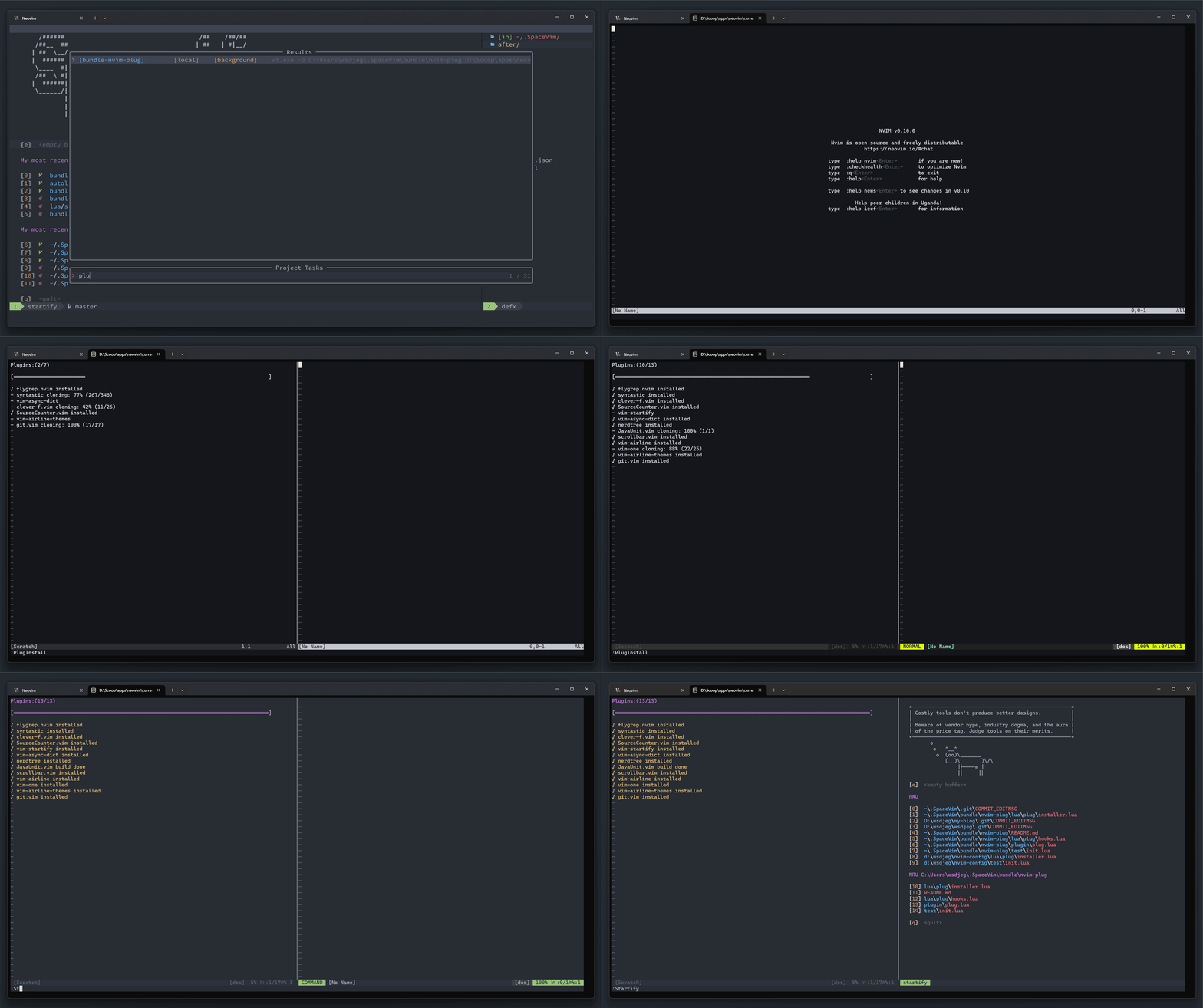
🎨 UI
Default UI
The default UI is inspired by Vundle.vim.
The default highlight groups are:
| Highlight Group Name | Default Link | Description |
|---|---|---|
PlugTitle |
TODO |
the first line of plugin window |
PlugProcess |
Repeat |
the downloading progress |
PlugDone |
Type |
clone/build/install done |
PlugFailed |
WarningMsg |
clone/build/install failed |
PlugDoing |
Number |
job is running |
To change the default highlight group:
-- In Lua
vim.api.nvim_set_hl(0, 'PlugTitle', { default = true, link = 'TODO' })
vim.api.nvim_set_hl(0, 'PlugProcess', { default = true, link = 'Repeat' })
vim.api.nvim_set_hl(0, 'PlugDone', { default = true, link = 'Type' })
vim.api.nvim_set_hl(0, 'PlugFailed', { default = true, link = 'WarningMsg' })
vim.api.nvim_set_hl(0, 'PlugDoing', { default = true, link = 'Number' })
" In Vimscript
hi def link PlugTitle TODO
hi def link PlugProcess Repeat
hi def link PlugDone Type
hi def link PlugFailed WarningMsg
hi def link PlugDoing Number
Notify UI
You can also change the UI to notify, provided by wsdjeg/notify.nvim.
You need to install it before using nvim-plug!
local function bootstrap(repo)
  if vim.fn.isdirectory(dir .. repo) == 0 then
    vim.fn.system({
      'git',
      'clone',
      '--depth',
      '1',
      'https://github.com/' .. repo .. '.git',
      dir .. repo,
    })
  end
  vim.o.runtimepath = vim.o.runtimepath .. ',' .. dir .. repo
end

bootstrap('wsdjeg/job.nvim')
bootstrap('wsdjeg/logger.nvim')
bootstrap('wsdjeg/notify.nvim')
bootstrap('wsdjeg/nvim-plug')

require('plug').setup({
  ui = 'notify',
})

require('plug').add({
  {
    'wsdjeg/notify.nvim',
    fetch = true,
  },
  {
    'wsdjeg/nvim-plug',
    fetch = true,
  },
})
Custom Plugin UI
To setup custom UI, you need to create an on_update() function.
This function requires two parameters:
name(string) - plugin nameplugUiData(see below) - plugin status data
plugUiData is table with following keys:
| Key | Type | Description |
|---|---|---|
command |
string |
Current operation: 'clone', 'pull', 'curl', 'build', 'luarocks' |
build_done |
boolean |
Build completed successfully |
building |
boolean |
Build is in progress |
clone_done |
boolean |
git clone completed successfully |
clone_process |
string |
git clone progress, e.g., 16% (160/1000) |
curl_done |
boolean |
Download completed successfully |
is_local |
boolean |
Plugin is a local plugin (skipped) |
luarocks_done |
boolean |
LuaRocks installation completed |
pull_done |
boolean |
git pull completed successfully |
pull_process |
string |
git pull progress information |
--- your custom UI

local function on_ui_update(name, data)
  -- Example: log plugin updates
  if data.clone_done then
    print(string.format('✓ %s installed', name))
  elseif data.pull_done then
    print(string.format('✓ %s updated', name))
  elseif data.build_done then
    print(string.format('✓ %s built', name))
  end

  -- Handle errors
  if data.clone_done == false then
    print(string.format('✗ %s failed to install', name))
  end
end

require('plug').setup({
  ui = on_ui_update,
})
📊 Plugin Priority
By default this feature is disabled. Plugins will be loaded when running add().
To enable the plugin priority feature, you will have to run plug.load() after executing plug.add().
This option is not available for lazy-loading plugins!
For example:
require('plug').setup({
  max_processes = 5,
  enable_priority = true,
})
require('plug').add({
  {
    'wsdjeg/scrollbar.vim',
    events = { 'VimEnter' },
  },
  {
    'wsdjeg/vim-chat',
    enabled = function()
      return vim.fn.has('nvim-0.10.0') == 1
    end,
  },
  {
    'wsdjeg/flygrep.nvim',
    cmds = { 'FlyGrep' },
    config = function()
      require('flygrep').setup()
    end,
  },
  {
    'rakr/vim-one',
    priority = 100,
    config = function()
      vim.cmd('colorscheme one')
    end,
  },
})
require('plug').load()
Plugins with higher priority values are loaded first. Default priority is 50.
🔍 Picker Sources
nvim-plug also provides a source for picker.nvim,
which can be opened with :Picker plug.
| Action | Key Binding | Description |
|---|---|---|
open_terminal |
<C-t> |
open floating terminal with plugin.dir. Requires terminal.nvim. |
open_plug_url |
<C-b> |
open the URL of the selected plugin via default browser. |
copy_plug_url |
<C-y> |
copy the URL of the selected plugin. Use the " register. |
tabnew_lcd |
<Enter> |
create new tab, then change current dir to the plugin root |
📣 Self-Promotion
Like this plugin? Star the repository on GitHub.
Love this plugin? Follow me on GitHub.
💬 Feedback
If you encounter any bugs or have suggestions, please file an issue in the issue tracker.